Day two begins with official welcome to Larrakia country from Dorothy Fox, a representative from Charles Darwin University & Helen Wozniak, conferene coordinator.
Then a demonstration of turning point keypad & brief introduction from Netspot - a conference sponsor.
Keynote from Prof. Ron Oliver was on 'taking distance out of campus study. Well structured, covering the salient points of 'learning design' including a website which archives examples of teaching and learning design and has facility for others to add their examples.
Aspects of 'reusable learning design aligned to info. access, info. organisation and info. processing in the form of task directed (teacher led), task guided (guided) & task autonomous (independent) 'flowcharts' or recommendations. Important to have a learning plan, construct delibrate learning activites, planned form of engagement, provide content & info. learning guides and supports / scaffolds to learning.
Reinforces need to use assessment tasks as learning (LOA) & improving students' engagement with learning.
Tuesday, July 07, 2009


Monday, July 06, 2009
Workshop 2 at Herdsa2009 by Mike Keppel & Dominique Parrish
Second workshop on "transforming higher education through learner orientated assessment" presented by Prof. Mike Keppell from Charles Sturt University & Dominique Parrish from University of Woolongong. Mike started with overview of assessment including differences between summative / formative, assessments of, for and as learning and learning orientated assessments (LOA).
LOA is defined as using assessment tasks as learning tasks, supporting students to become self evaluators and using feedback as 'feed forward.' Based on work by Carless, Joughin & Liu (2006) & Keppell & Carless (2006). For me, it is an offshoot of 'learning design' & student centred learning with assessments being student directed and enhancing learning.
Dominique presented with guidelines on how to achieve transformative change in education using the development of LOA as context. Ten points proposed to assist the process for transformative leaders to assist their team / organisation towards sustainable & dramatic change.
LOA is defined as using assessment tasks as learning tasks, supporting students to become self evaluators and using feedback as 'feed forward.' Based on work by Carless, Joughin & Liu (2006) & Keppell & Carless (2006). For me, it is an offshoot of 'learning design' & student centred learning with assessments being student directed and enhancing learning.
Dominique presented with guidelines on how to achieve transformative change in education using the development of LOA as context. Ten points proposed to assist the process for transformative leaders to assist their team / organisation towards sustainable & dramatic change.
Herdsa 2009 - workshop on assessments with David Boud
In sunny & warm Darwin for the HERDSA2009 conference at Charles Darwin University and attending workshop sessions today. First up, Dr. David Boud's session on 'reconstructing assessment for longer-term learning: Generating positive student experiences through future orientated assessments.
The workshop was centred on work completed for the Australian Learning & Teaching Council and a website has been set up as a resource site. This site provides good information on key assessment elements which include engaging students, using authentic activities, allowing students to design assessments, assessing using integrative activities, helping students to learn judgement, modeling the practice of good asbe susessments, allowing students to work with peers and reommendations on giving and recieving feedback. There is also an option for practitioners to provide examples of effective practice.
In order for assessments to be viable for longer term learning, they need to be sustainable, help students develop informed judgement, onstruct reflexive learners and contribute towards the formation of becoming practitioners.
A good session, raising very pertinent questions and feedback from various partiipants. It was also heartening to see participants were interested in improving assessment practice and keen to provide students with better ways to learn via assessment.
The workshop was centred on work completed for the Australian Learning & Teaching Council and a website has been set up as a resource site. This site provides good information on key assessment elements which include engaging students, using authentic activities, allowing students to design assessments, assessing using integrative activities, helping students to learn judgement, modeling the practice of good asbe susessments, allowing students to work with peers and reommendations on giving and recieving feedback. There is also an option for practitioners to provide examples of effective practice.
In order for assessments to be viable for longer term learning, they need to be sustainable, help students develop informed judgement, onstruct reflexive learners and contribute towards the formation of becoming practitioners.
A good session, raising very pertinent questions and feedback from various partiipants. It was also heartening to see participants were interested in improving assessment practice and keen to provide students with better ways to learn via assessment.
Wednesday, July 01, 2009
Visit by Paul Levy from Swinburne TAFE
Paul Levy from Swinburne TAFE visited yesterday to do a catch up on e & mlearning projects at CPIT. We started with the HP tablet project run by Dave Kennnedy & Daphne Robson. Daphne provided a good introduction to the capabilities of using tablet PCs to enhance learning of mathematics and statistics fro pre-health & nursing students. There are inherent advantages to using this form of technology in association with class presenter. Students are able to work on ‘problems’ which have been collated using powerpoint. When they have solved the ‘problem’ they are able to sent their answer to the tutor. All of the answers from the class can then be compared, discussed, analysed etc. In all, an excellent example of social & participative learning in action In the near future, I will need to explore the possibility of using class presenter with mobile devices.
Paul & I then had a chat about his projects. He recommended the Nokia Omnia as an alternative to iphones plus also demonstrated the use of livescribe to archive and document the various conversations & meeting we were having.
We next called on Nick Ford to discuss elearning and how to enthuse reluctant educators into making use of ICT. A good discussion followed by Nick sharing resources relevant to the teaching of electrotech including crocodile clips absorb electronics and designing circuits using yenka electronics.
After lunch, we travelled across to the Sullivan Avenue CPIT site to visit the Technical Innovation Institute tutors. First up, a good chat with Cameron Wright from carpentry about how they use etxt to support workplace based apprentices along with assessment processes used by carpentry. Carpentry also uses student diaries to good effect to journal workplace based skill acquisition.
Then a fruitful conversation with Sean Flanagan, faculty academic coordinator & automotive tutor and Stephen Price, programme manager for engineering & electrical. The main objective was to learn about how best to cluster competency based units into manageable learning clusters, modules and in particular to explore how the concept of ‘projects’ could be useful. Stephen also took us around the electrical training areas which had lots of good resources for students to learn about the practical aspects of electrical trades. Andrew Massie, electrical tutor then showed us his Moodle site & had a chat with Paul with regards to collaborative activities that could involve students from both CPIT & Swinburne.
All in a good day for me to catch up on various activities at CPIT, have in-depth discussions with Paul on e & mlearning and to find out how others approach the teaching of trades content.
Paul & I then had a chat about his projects. He recommended the Nokia Omnia as an alternative to iphones plus also demonstrated the use of livescribe to archive and document the various conversations & meeting we were having.
We next called on Nick Ford to discuss elearning and how to enthuse reluctant educators into making use of ICT. A good discussion followed by Nick sharing resources relevant to the teaching of electrotech including crocodile clips absorb electronics and designing circuits using yenka electronics.
After lunch, we travelled across to the Sullivan Avenue CPIT site to visit the Technical Innovation Institute tutors. First up, a good chat with Cameron Wright from carpentry about how they use etxt to support workplace based apprentices along with assessment processes used by carpentry. Carpentry also uses student diaries to good effect to journal workplace based skill acquisition.
Then a fruitful conversation with Sean Flanagan, faculty academic coordinator & automotive tutor and Stephen Price, programme manager for engineering & electrical. The main objective was to learn about how best to cluster competency based units into manageable learning clusters, modules and in particular to explore how the concept of ‘projects’ could be useful. Stephen also took us around the electrical training areas which had lots of good resources for students to learn about the practical aspects of electrical trades. Andrew Massie, electrical tutor then showed us his Moodle site & had a chat with Paul with regards to collaborative activities that could involve students from both CPIT & Swinburne.
All in a good day for me to catch up on various activities at CPIT, have in-depth discussions with Paul on e & mlearning and to find out how others approach the teaching of trades content.
Wednesday, June 24, 2009
Recent resources on elearning and mlearning
A good resource via Bronwyn Hegarty at Otago Polytechnic published by University of Woolongong details research projects conducted there on the use of mobile learning in higher education. Articles include an overview, how to encourage faculty to adopt the use of new technologies and descriptions and some evaluations of various projects with mainly full time students in education using mobile phones and ipods. The last chapter on design principles provides practical guidelines and recommendations.
Other resources of interest that have come up over the last fortnight or so include :
1) A more wide ranging review taken by the Commonwealth of Learning which discusses education for a digital world. This includes articles on how to prepare and implement technology in education followed by examples of various applications and projects.
2) educating the net gen is a Australian study and a handbook of findings for policy & practice. It recommends a cautious, planned approach to be taken as not all students (despite hype) are ready or willing to engage with the use of technology in their learning and not all staff are prepared to make the leap across the chasm to adopt the use of technology in teaching.
3) Two articles recommended to follow up on mobile / social networking use in university. One on policy and the other a response from JISC to the recommendations in the 2007 report ‘Web 2.0 for Content for Learning and Teaching in Higher Education.
4) A literature review of elearning research in the workplace via Ako Aoteoroa. The articles reviewed are accessed via a visual representation of the various aspects of the review. A good example of how to provide a simple portal to lots of information.
5) And a book to catch up on which discusses What if? About the use of technology in the 21st century classroom
6) Website of the American 21st century schools provides good conversation / discussion starter with what is 21st century education along with resources and information on curriculum & instruction and critical pedagogy. Has a mainly compulsory K-12 focus but much of relevance to tertiary ed. as well.
I intend to work through these in the next month or so. Many of the above bring the realism of putting ICT into practice into real educational settings. As I speak to many tutors around NZ, I find that many realise the need to assist learners to learn important 21st century skills of collaboration, critical thinking and citizenship. However, not all are convinced about using ICT as one of the tools. Maybe they have a point. However whether we want to or not, we now live in a world & in societies influenced by technology. Many of our students will live beyond our own live times. Do we do them a disservice by not modelling as teachers, flexibility, self-directed and life-long learning and openness to evaluating new ideas?
Other resources of interest that have come up over the last fortnight or so include :
1) A more wide ranging review taken by the Commonwealth of Learning which discusses education for a digital world. This includes articles on how to prepare and implement technology in education followed by examples of various applications and projects.
2) educating the net gen is a Australian study and a handbook of findings for policy & practice. It recommends a cautious, planned approach to be taken as not all students (despite hype) are ready or willing to engage with the use of technology in their learning and not all staff are prepared to make the leap across the chasm to adopt the use of technology in teaching.
3) Two articles recommended to follow up on mobile / social networking use in university. One on policy and the other a response from JISC to the recommendations in the 2007 report ‘Web 2.0 for Content for Learning and Teaching in Higher Education.
4) A literature review of elearning research in the workplace via Ako Aoteoroa. The articles reviewed are accessed via a visual representation of the various aspects of the review. A good example of how to provide a simple portal to lots of information.
5) And a book to catch up on which discusses What if? About the use of technology in the 21st century classroom
6) Website of the American 21st century schools provides good conversation / discussion starter with what is 21st century education along with resources and information on curriculum & instruction and critical pedagogy. Has a mainly compulsory K-12 focus but much of relevance to tertiary ed. as well.
I intend to work through these in the next month or so. Many of the above bring the realism of putting ICT into practice into real educational settings. As I speak to many tutors around NZ, I find that many realise the need to assist learners to learn important 21st century skills of collaboration, critical thinking and citizenship. However, not all are convinced about using ICT as one of the tools. Maybe they have a point. However whether we want to or not, we now live in a world & in societies influenced by technology. Many of our students will live beyond our own live times. Do we do them a disservice by not modelling as teachers, flexibility, self-directed and life-long learning and openness to evaluating new ideas?
Friday, June 19, 2009
Mike Anderson's presentation on implications of the new NZ Curriculum on tertiary
Mike Anderson, principal at Waimairi Primary School and an avid promoter of the use of ICT in primary school teaching, presented at the monthly CPIT Educational Strategy group meeting.
Mike’s presentation was focused around the new NZ National Curriculum which is to begin in all schools next year. He began with a quick tour of how NZ had a curriculum that was student centred and geared to the needs of the community back in the 1930s when the then prime minister, Michael Joseph Savage, appointed C.E Beeby as the director of education. An example was the work of Darracott who taught students via building a house, 2/3 to scale at Jackson’s Mill in Kotuku.
Mike's approach to the new curriculum was to engage his staff and the community in order to base their school’s direction on a ‘localised curriculum’ which was based on 21st century needs. He proposed the importance of ensuring that practices (what) and principles (how) used by teachers in the classroom were well anchored in their core values and beliefs (why). He was keen to incorporate four of the key competencies (thinking, participating and contributing, managing self and relating to others) into a quadrant that could be used to inform teachers, parents and students of their progress.
He used the analogy of the TV shows ‘who wants to be a millionaire’ as an example of the transmissive model of education still prevalent in society when we should be promoting and supporting the skills of confident, connected, activity involved and lifelong learners in education. An example would be the TV show ‘monster garage’ or another example I have occasionally followed ‘junkyard wars’.
He then provided examples of how primary school students are being encouraged and taught the skill to be producers and not consumers. These were in connect TV and Rock our world, programmes his students have engaged & participated in.
Mike’s presentation was focused around the new NZ National Curriculum which is to begin in all schools next year. He began with a quick tour of how NZ had a curriculum that was student centred and geared to the needs of the community back in the 1930s when the then prime minister, Michael Joseph Savage, appointed C.E Beeby as the director of education. An example was the work of Darracott who taught students via building a house, 2/3 to scale at Jackson’s Mill in Kotuku.
Mike's approach to the new curriculum was to engage his staff and the community in order to base their school’s direction on a ‘localised curriculum’ which was based on 21st century needs. He proposed the importance of ensuring that practices (what) and principles (how) used by teachers in the classroom were well anchored in their core values and beliefs (why). He was keen to incorporate four of the key competencies (thinking, participating and contributing, managing self and relating to others) into a quadrant that could be used to inform teachers, parents and students of their progress.
He used the analogy of the TV shows ‘who wants to be a millionaire’ as an example of the transmissive model of education still prevalent in society when we should be promoting and supporting the skills of confident, connected, activity involved and lifelong learners in education. An example would be the TV show ‘monster garage’ or another example I have occasionally followed ‘junkyard wars’.
He then provided examples of how primary school students are being encouraged and taught the skill to be producers and not consumers. These were in connect TV and Rock our world, programmes his students have engaged & participated in.
Thursday, June 18, 2009
blogging with a phone
As a subset of evaluating web site creating websites using mobile phones to create eportfolios, I have also been keeping an eye on developments in mobile blogging. There has always been the capability via Nokia’s lifeblog or with the Nokia using a variety of other apps but several recent developments have made it even easier to blog using a variety of phones.
To start with, NZ Telecom’s recent launch of its XT network not only provides faster mobile web surfing speeds but also promotes phones that allow direct access to bebo and a poster at the local telecom store also promoted access to facebook and twitter.
Vodaphone offered and promoted access to Web 2.0 sites from the middle of last year, sites including trademe, bebo, youtube, facebook and Wikipedia.
Sue Water’s provides a good overview of how to blog using an iphone.
Coupled to the above is the ease by which it is now possible to sent a photo, video, audio file or text to social networking sites that were part of our original evaluations (vox, multiply) and to traditional blogging platforms like blogger and wordpress.
So the choices are increasing and this might have to be the way to go with mobile eportfolios if the evaluations for creating mobile websites as eportfolio sites using mobile phones becomes too difficult.
To start with, NZ Telecom’s recent launch of its XT network not only provides faster mobile web surfing speeds but also promotes phones that allow direct access to bebo and a poster at the local telecom store also promoted access to facebook and twitter.
Vodaphone offered and promoted access to Web 2.0 sites from the middle of last year, sites including trademe, bebo, youtube, facebook and Wikipedia.
Sue Water’s provides a good overview of how to blog using an iphone.
Coupled to the above is the ease by which it is now possible to sent a photo, video, audio file or text to social networking sites that were part of our original evaluations (vox, multiply) and to traditional blogging platforms like blogger and wordpress.
So the choices are increasing and this might have to be the way to go with mobile eportfolios if the evaluations for creating mobile websites as eportfolio sites using mobile phones becomes too difficult.
Monday, June 15, 2009
Adult and Community Education conference 2009
On Saturday, Nick Ford, Robin Graham and I presented at the annual ACE conference, held at the Wharenui at CPIT. Nick presented on the 21st century learner, I did a short spiel on cloud computing, web 2.0 & mobile learning and Robin completed the loop with a session on design for learning.
Our session was well attended and there was lots of interest shown along with lots of questions generated. I experimented this time by using a Word document with logos of web 2.0 sites and other hyperlinks as a base to the presentation. As the session was so short, the hyperlinks could then be useful to participants for future self directed exploration of the various sites and links.
Friday, June 12, 2009
e-ako resource
Mark Nichols from Laidlaw College has compiled a series of e-primers. These are funded via Ako Aoteoroa and archived on their site. The site is now becoming an excellent resource for tertiary educators in New Zealand.
#1 – elearning in context sets the scene with an overview and introduction to elearning in Aoteroa-New Zealand and within the tertiary learning context.
#2 elearning & faculty explores how to engage and support faculty in using ICT and elearning in enhancing their own professional development and to enhance student learning.
#3 design for elearning provides guidelines on designing elearning ‘courses’ and in incorporating ICT into learning experiences for students.
#2 online discourse discusses online forums and other means for communicating with virtual learners.
Currently being written is - #5 - E-xtending possibilities Web 2.0; ePortfolios; virtual worlds; lifelong learning.
Mark also maintains a blog and there is a pertinent blog on mlearning which challenges assumptions made about the ubiquity and usefulness of mlearning.
All in a good resource for anyone teaching elearning to use as a source of readings or course activities or for teachers embarking on some self-directed study on elearning.
Tuesday, June 09, 2009
Presentations at Waiariki & Otago Polytechnics
As part of my research project investigating the perspectives of ‘new’ trades tutors in polytechnic teaching, I visited Waiariki Polytechnic in Rotorua last week and Otago Polytechnic this week. Funding from Ako Aoteoroa Southen Hub has allowed me to travel to interview tutors in both the North Island and the South Island.
As I was going to be visiting I offered each Polytechnic the option of a lunch time workshop / presentation on the work on elearning & mobile learning at CPIT. It was a good opportunity to catch up with how other polytechnics are introducing and working with technology and to meet kindred spirits.
At Waiariki, I was hosted by Liz Fitchett, staff developer and food safety tutor. At Otago, my host was Terry Marler, elearning developer with a background in veterinary sciences.
Waiariki is starting out on their elearning journey supported by one of the modules in their tutor training programme on flexible learning and most of the modules with online components. However, the work of innovators was stymied by the slow & sometimes intermittent internet access, due in part to Rotoroa’s geographical location off the main north-south highway between Auckland and Wellington. The slow internet access means that sites which have potentially useful resources for use with full-time classes are blocked!
Otago being a larger institution is well advanced in the use of technology in teaching and learning. The polytechnic is currently moving from Blackboard across to Moodle and staff education has a dedicated elearning team . I met with Adrian Woodhouse and Tony Heptinstall after my presentation to find out how their project was going. The cookery team has also been busy putting videos of lessons on youtube which can then be downloaded by students to ipods for revision. We discussed ways to enhance the use of these videos, in particular to use them as starting points for theory sessions or as a focus point for ‘homework’.
Visiting other institutions provides a good opportunity for me to reflect on the directions that staff development (particularly in the ICT) area are taking (or not taking) at CPIT. In general, all the institutions are still reliant on the enthusiasm of ‘early adopters’ to take the lead and to initiate the embedding of ICT into teaching and learning. What we all now need to do is to provide incentives for the next level of tutors who are interested but ambivalent. Providing resourcing for ‘early adopters’ to mentor ‘interested but cautious’ tutors might be one approach.
Wednesday, June 03, 2009
learning for life in the 21st century: book review
Long weekend well occupied with the National Scrabble Tournament, held this year in Christchurch. However, took time out on Monday to read the book “Learning for life in the 21st century: Sociocultural perspectives on the future of education” a book edited by Gordon Wells & Guy Claxton (also author of book ‘what’s the point of school’)
This is a good book providing good information on applying sociocultural perspectives to teaching & its impact on learning. The most significant factor in learning are the cultural settings in which learning takes place, the learning activities employed to engage learners in participative learning and how each informs the other. It’s very readable book, explaining sociocultural perspectives without resorting to high academese. The bibliography is an excellent resource on sociocultural learning theories which provides me with an additional source of exploration and more reading.
Chapter 2 by Guy Claxton provides a good introduction to sociocultural perspectives and their relevance to learning. Chapter 4 – the gift of confidence : A Vygotskian view of emotions by Holbrook Mahn & Vera John-Steiner reiterates the importance of affect in thinking & action. Effective lifelong learning emanates from growing confidence & the chapter introduces & explores ways in which support from colleagues, mentors, teachers etc. can enables people to be willing to take risks and try out new ideas. Chapter 6, sociocultural perspectives of assessment by Caroline Gipps argues for recognition of the social process in assessment. Assessments need to be more dynamic in order to catch some essence of the ‘learner in action’ instead of just measuring how much knowledge has been transmitted / absorbed.
Chapters 8 through to fourteen have very pertinent articles on school age learning & development, all of which reinforce the influence of social relationships, culture and environment as important contributors to learning.
This is followed by a series of chapters of relevance to all educational sectors with an emphasis on the use of cultural historical activity theory (CHAT) in research. For example, chapter 16 by Yrjo Engestrom, Ritva Engestrom & Arja Suntio provides a good example of the use of activity theory in researching education (in this case teacher development within a school community). Another example in chapter 17 by Katherine Brown and Michael Cole is also available as a paper about after school learning.
Chapter 19 by Andy Northedge (also author of The Good study guide) is especially relevant to my current teaching. This chapter is titled ‘organising excursions into specialist discourse communities: a sociocultural account of university teaching. It provides good guidelines on how to gradually bring students into academic reading via ‘constructing pathways into specialist discourse’. These pathways include the teacher ‘stepping outside’ the discourse & to engage students using discourses that are familiar to them, to plan the route of entry & engagement with the discourse using ‘a flow of meaning structured as a plot’ and to coach the students in ‘speaking with the locals’. Much of this I practice via cognitive apprenticeships but using the ‘plot’ scenario provides me with a better base from which to introduce students new to the field of adult learning to the literature of educational research.
Tuesday, June 02, 2009
Evaluating mobile web site platforms to set up portfolios using mobile phones
My available ‘research time’ over the last few weeks has been to desktop & blackberry test a range of mobile web site platforms. I am trying to find an easy to use site that allows eportfolio evidence to be directly uploaded on to mobile web pages. Thereby enabling the creation of an eportfolio by using only the mobile phone. I found a website which previews, reviews and archives useful mobile webpages. The mobile version provides an example of good mobile webpage design.
A host of mobile web sites platforms have emerged over the last year or so. Most tend to have desktop based interfaces. In general these were all easy to use, with good visual layout and icons that make sense. The influences of web 2.0 type user interfaces prevail.
As an example of how quickly mobile website development platforms have developed, just compare winksite, one of the original mobile website platforms to jag a relatively newer one via celladmin. One is dated and although easy to use as a whole, it is not so simple to, for instance, add a picture. The other, although desktop based, provides a 30second interface to put up mobile greetings, invitations and sites and allows easy links to linkedin, myspace, facebook & google.
Most of the sites were optimised for development of the webpages via desktop computers. Included in category were wirenode, mobfive (in Swedish), swiftmob, jag and mofuse. Good examples of desktop interfaces include mobisite galore, zinadoo. tagtag, mobilemo, wapple and wapamama. All of these are optimised for setting up webpages on a desktop / laptop and not directly from a mobile phone.
There was one which worked well on mobile phones but required input in HTML, not an easy option on a mobile phone. Phn would be difficult for students to use as a tutorial on HTML will be required first. Mobisite galore may be suitable as you are able to set up a customised template first & then input more items are required.
Two possibilities have emerged for further trial. Mobilikey provided the facility to create, update and post pictures to personal mobile websites via the desktop or directly through their cell phone or mobile device. The interfaces is quite user friendly. To post a picture, video or voice file, you basically email the file across. There is no preview screen, so you need to wait for the pictures to come through before you can view whether they have synched across.
xtgem is more visually attractive but harder to use via mobile phone. In order to include pictures etc. the browse button does not work on the phone so there is a need to store pictures etc on sites like flickr. Generally less intuitive to use compared to mobilikey. Plus in the preview screen, there is a embedded link to a site to view videos of girls! which will be an incentive for apprentices but does not wear well for me!
Another quick way is to make use of Nokia lifeblog. However, to date, very few students own a Nokia phone with internet access! Plus software needs to be downloaded on to a PC for ease of access to manipulate / collate the photos / videos and other blog items.
Also possibility of using the mobile learning engine which is a plug-in for Moodle. Links from various repositories for photos / videos etc. can archived on Moodle. Moodle site can then be the ‘aggregator page’ for a range of evidence.
Will put a few more sessions into testing out possibilities before evaluating a few with students.
Monday, May 25, 2009
Presentation at Aoraki Polytechnic staff professional development day
I was invited to do presentation at the Aoraki Polytechnic staff development day last Friday. I had a pleasant drive down to Timaru with grand views of the snow covered Southern Alps for company. The staff development day is one day when all staff at Aoraki come together to learn, network and re-create. Although Aoraki is based in Timaru, it has satellite campuses from Dunedin, Oamaru, Ashburton and Christchurch. The day is therefore a good way for staff separated not only be subject discipline areas but by geographical location to convene.
The day began with welcome in the three national languages of New Zealand, Maori, English & NZ signing. The CEO started the official talk fest followed by updates the various campus managers.
Keynote by Sue Lindsay on daring to be different.A good presentation on strategies for success and resilience in challenging times set the scene for the rest of the day. My presentation was well attended. I described the CPIT baking tech online & mportfolios underpinned by the precepts of cognitive apprenticeships.
This was then followed by brief presentations on the Aoraki Foundation learning project (taking a different approach to CPIT by using short staff development powows) and the Aoraki use of Moodle as an LMS.
Drove back to Christchurch into cold and wet weather which persisted through the weekend :(

The day began with welcome in the three national languages of New Zealand, Maori, English & NZ signing. The CEO started the official talk fest followed by updates the various campus managers.
Keynote by Sue Lindsay on daring to be different.A good presentation on strategies for success and resilience in challenging times set the scene for the rest of the day. My presentation was well attended. I described the CPIT baking tech online & mportfolios underpinned by the precepts of cognitive apprenticeships.
This was then followed by brief presentations on the Aoraki Foundation learning project (taking a different approach to CPIT by using short staff development powows) and the Aoraki use of Moodle as an LMS.
Drove back to Christchurch into cold and wet weather which persisted through the weekend :(
Tuesday, May 19, 2009
Wolfram Alpha
This came through on Derek Wenmouth’s blog. The wolfram alpha site is a computational visualisation tool. It is an interesting way to bring information together and especially useful for visual learners. It is at present a good resource for subjects that have some form of statistics or numeric emphasis to them.
A good video provides a series of examples. Examples from subjects associated with stats & numbers include maths, economics, geography (demographics). There are also interesting uses in using the site to calculate nutritional values, medical type measurements, climate and an extremely fascinating area of genetics (enter a gene sequence & see what happens!)
The site is an extension of the work of Stephen Wolfram’s work with mathematica and a new kind of science (NKS) which is to study science using a ‘principal of computational equivalence’ to discover links & synergies between various aspects of applied research in science.
The layout of the wolfram alpha pages allows display on mobiles. Chunks of information are also ‘micro’ providing sufficient information to do further exploration. Hopefully, a mobile version will be available in the not too distant future as some of the applications are imminently suited to mobile uses. For example, I would use the nutritional values one quite often & other ones on demographics / anagrammer/ current weather etc. can be useful when you encounter information that needs to be clarified & a desktop is not available.
Friday, May 15, 2009
Personal content management and mobiles
I was catching up on reading as preparation for writing a couple of papers for conferences. The concept of personal content management (PCM) came up via doing a Google search. Personal content management can be thought of as being a subset of personal information management (PIM). One way of bringing together personal information would be via mindmap tools like personal brain.
However, I was more interested in mobile versions of PCM and this dissertation on facilitating personal content management in smart phones by Antti Aaltonen provided useful reading. Antti is also one of the authors of a book on personal content experience: managing digital life in the mobile age which is a report on the work on a group on Nokia researchers. This site is always a good one to keep up with the latest on mobile technology.
The book covers a good overview of development in the past decade on an increase in mobility of people and their devices along with the growth and increasing importance being placed on personally generated content. Factors which enhance the development of PCMs include the ability to access content, share this content and through this sharing re-live the experiences stored. Confidence that the content will not disappear & that it can be kept private if required. Seeing the content as part of a bigger whole and being able to exploit ‘mobility, metadata and context’ to further extend on personally created content. Good links can be made with the concept of PCMs, eportfolios and narratives. This book actually uses five personas (two 16 year old students, a 28 year old activist, a 40 year old artist and a 56 year old plumber) through out the book to help explain the concepts introduced.
Of interest was the motivation towards mobility explained by our innate desire to be mobile (new nomads) and our short attention spans (five seconds!). I have recommended the book to the library and will do a more thorough evaluation of the book when it arrives.
Wednesday, May 13, 2009
Prezi
Prezi came via Ignatia webs. It’s a interesting presentation tool which provides a visually exciting alternative to the ubiquitous powerpoint. There are good examples in the prezi showcase including this one on why blog.
A good learning site is included which models the possibilities for using Prezi although less visual / interactive learners will appreciate the manual which provides good summaries.
Prezi is very intuitive to use. When you place an object or text on to your ‘frames’ the prezi wheel appears. This allows you to rotate the object, resize (zoom in/out) or move things around. Very cool!
I had a play and put together a presentation in about an hour, learning as I went along and experimenting with the options. Did not manage to remove some of the ‘frames’ but overall a useable presentation which I will tidy up next week.
The presentation can be assessed via the web or you can download as a zip file and run without actually having to be web connected. File is very large but opened smoothly on to my desktop.
This is possibly the best find so far this year (apart from Google books & xtimeline)
A good learning site is included which models the possibilities for using Prezi although less visual / interactive learners will appreciate the manual which provides good summaries.
Prezi is very intuitive to use. When you place an object or text on to your ‘frames’ the prezi wheel appears. This allows you to rotate the object, resize (zoom in/out) or move things around. Very cool!
I had a play and put together a presentation in about an hour, learning as I went along and experimenting with the options. Did not manage to remove some of the ‘frames’ but overall a useable presentation which I will tidy up next week.
The presentation can be assessed via the web or you can download as a zip file and run without actually having to be web connected. File is very large but opened smoothly on to my desktop.
This is possibly the best find so far this year (apart from Google books & xtimeline)
Friday, May 08, 2009
21st century elearning - virtual schools
Yesterday, I attended a presentation by Professor. Niki Davis, University of Canterbury and Bridget Somekh, Canterbury fellow from Manchester Metropolitan University on 21st century elearning at a CPIT lunch time meeting convened by Nick Ford.
An example of 21st century elearning was presented via case studies of virtual schools. This was defined as primary and secondary school students being able to learn from a teacher who was not situated geographically in the same school.
An example of 21st century elearning was presented via case studies of virtual schools. This was defined as primary and secondary school students being able to learn from a teacher who was not situated geographically in the same school.
Case studies were presented on the Florida virtual school, Iowa learning online and an example from the UK called ‘not school’ convened by Anglia Ruskin Ultralab (now disbanded). Each virtual school had different organisational and funding structures and met various objectives. What most had in common was the ability to provide access to specialised teachers who were recognised as leaders in their field.
Many virtual schools are set up around video conferencing facilities so that a teacher is able to teach more than one class at a time, one in physically in front of them and another linked to them via video conferencing. This provided opportunities for students in smaller schools and in rural / remote areas to study subjects they were interested in. The UK example catered to students who had been removed from the school system or who had reasons that prevented them from attending school (eg. Victims of bullying).
All in, interesting to learn about the diversity in virtual schooling, be provided with examples of teachers who exemplify good elearning practice and view the technology currently in use.
Monday, May 04, 2009
Mindmapping tools #2 & timeline tool
These came via Jane Hart’s great blog.
First up, personal brain. This provides for the construction of a traditional mindmap. It is very user friendly and intuitive to use. It has comprehensive features which allow you to link to your files, webpages etc. so that it becomes an extension of your usual filing / folder system on your desktop. A guide to ways to use personal brain is a good summary of the uses for mindmaps.
The other was dropmind which is available as a web version or desktop version. This is a more visually exciting platform & the web version allows multiple users to edit and share a mindmap. Presentations can also be generated. The user guide is a pdf file (compared to personal brains series of videos) but the interface is intuitive and user friendly and should not be difficult for students engage with after a short introduction.
Another interesting concept is xtimeline. This nifty site has a collection of timelines ranging from the history of tea to economics to notables like Steve Jobs and Beethoven. There is also a history of the internet which is open for public editing. You are able to make use of the timelines posted by other users as a resource or built ones yourself. Each node in the timeline is a link to more information including pictures and videos. Individuals or groups can work on each timeline so this resource is ideal for use in education.
All not suitable for mobile use as yet but xtimeline has potential due to it's ability to organise a lot of information into a small start up page & then provide the links greater information depth via each node.
Wednesday, April 29, 2009
Blogging good practice and with youme
This week I am facilitating a discussion forum with a group of tutors enrolled on the ICT for education course. My brief is to introduce the concepts of blogging & start discussion on how to use blogging in either their own personal development or as a teaching / learning tool.
There are guidelines to corporate blogging which mirror the CPIT guidelines for staff who maintain blogs. What I needed to find is guidelines for educational blogging. Found a good overview by Jeremy Williams via Google Scholar which also includes an appendix on resources on blog methods and blogs in learning.
So far, the uses of blogging proposed by course members were to make use of blogs to improve on student reflection. I wanted to move the tutors beyond this so that blogging could be used in a more synergistic manner for students to record their learning journey; network with other people (not in their own class) studying in the same area; share, discuss & evaluate their learning with others in the class; archive the resources that they find & record their initial reactions so that they are able to compare these with later perspectives. In short, guiding students towards the left hand bottom corner of the matrix proposed by Scott on post about matrix of some uses of blogs.
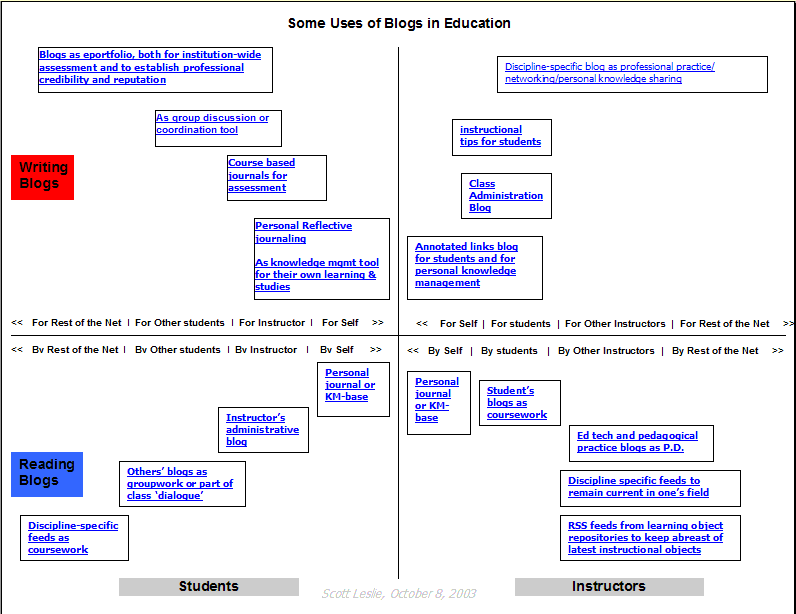
Also, this week, Tricia Lewis (with Stephanie Roberts) presented a session on using blogging to help students learn English as part of the School of Humanities sharing of good practice series. Trish & her brother set up youme to encourage students (familiar with social networking) to practice their English via blogging. 300 students now use this site although not all are blogging regularly. The site has features with are user friendly to use including allowing students to blog, chat & take part in discussion forums. Groups of students can be brought together in clubs. This makes it easier for the teacher to work with students as they engage with blogging & for the students in each class to share their work. Great stuff & good to see most of the tutors in the language area taking up the challenge to make use of blogging to enhance student learning.
Tuesday, April 28, 2009
ITF presentations now online
All presentations described in previous two blogs now available online. I browsed through a few of the ones I did not attend as I was attending the other session running concurrently.
The most useful ones were:
Literacy & numeracy or qualifications – which matter more in employment, and does participation in upskilling differ by industry group by David Earle, Elliot Lawes & Paul Satherley of the Ministry of Education which came out of the ALLs surveys now summarised.
The ETITO development of industry relevant strategic training plans by Dr. Dominic Madell & Dr. Heather Lees.
ITO literacy & numeracy good practice from Dr. Nicky Murray of the ITF, Helena Parsons from Quartz Clarity & Dr. Gene Kumekawa from the TEC.
The most useful ones were:
Literacy & numeracy or qualifications – which matter more in employment, and does participation in upskilling differ by industry group by David Earle, Elliot Lawes & Paul Satherley of the Ministry of Education which came out of the ALLs surveys now summarised.
The ETITO development of industry relevant strategic training plans by Dr. Dominic Madell & Dr. Heather Lees.
ITO literacy & numeracy good practice from Dr. Nicky Murray of the ITF, Helena Parsons from Quartz Clarity & Dr. Gene Kumekawa from the TEC.
Friday, April 24, 2009
ITF research forum day 2
Day two began with a presentation by Dr. Karen Vaughan on conditions & strategies for making the most of workplace learning. Understanding challenges presented by workplace learning presents the opportunity to work on strategies to improve learning in the workplace. Workplace learning defined as on the job + off the job + integration with business strategy. 21st century workplace learning needs are impacted on by speed of adoption of technology, globalisation etc. challenges include the tensions between knowledge & skill, hierarchies & roles, and learners & motivation. Others include how workplace interactions are enacted, the complexity of the task, what regulations cover the business, how much technology needs to be introduced or utilised, how market forces impact, the workplace culture, suitable learning strategies, involvement peers, mentors & learners in goal setting, availability of feedback & knowledge sharing (reflection) and opportunities to practice & take some risks.
Concurrent sessions follow the rest of the day. First one I attended is from Helen van der Werff, from the Horticulture ITO on increasing the impact of industry training investments in the horticulture industry. Based on qualitative nation wide survey of 19 businesses & interviews with 4 ITO training advisors. Harvey & Harris (2008) 7 drivers of productivity used to access productivity & learning to performance process (Brinkerhoff, 2002), logic of training, a high impact learning management (Brinkerhoff, 2001) used to inform the study.
Second presentation from the Department of Labour on skills in demand: past, present & likely in the future from Dr. Ram SriRamaratnam, Richard Manning and Xintao Zhao. This covered brief overview of skill concepts (types & measures), employment skills (their mix & content), high level skills categories and skills demand (2003, 2008 & 2013). Demand also include additional / expansion demain, replacement / retirement demand. In summary, still a need for ‘skilled workers’ into the future due to forecasted replacement & retirement demands.
After lunch, first session up was from Paul Mahoney from the Ministry of Education on factors associated with success in industry training and modern apprenticeships – what the data tells us. Over 180,000 industry trainees / apprentices in 2008. Analysis at the moment focuses on credits & national qualifications completed as proxies of success. Two reports, one of industry training & one on Modern apprenticeships just produced. In industry training, 35% of students entering complete their full course within 5 years. Similar levels of completion to polytechs / private providers & rates in UK (27 – 40%) & Australia (45%). Females more likely to complete than males. Some industries in NZ have higher levels of workplace based training completions for both trainees & modern apprentices. Older workers more likely to complete.
Then attended session on a comparative analysis of stakeholders’ evaluation of NZ industry training strategy within the tourism & public sectors from Lois Parkes of Victoria University. Lit review reveals, interest in skill from publick policy & business perspectives, assumptions that skill = qualification, investment = outcome, many economies have fallen short of the high skill = high wage vision. Evaluation was based on a positivist bias therefore stakeholders perspectives & experiences are not taken into account. There is a research gap as not the whole range of stackholders perpectives have been collected, collated & compared.
Last session of the day was on embedded workplace training: benefits for the health & disability sector by Liz Stephenson from Careerforce & Rose Ryan from Athena Research. Embedded model of training is defined. Features of how organisations obtain maximise, support & evaluate cost effectiveness. Learning and assessment were part of workplace practice, support provided by Careerforce workplace advisors to assist trainees in using workbooks, learning resources & trainee verification. Embedding requires a high level of commitment & resourcing but costs are offset by reduced turnover / recruitment & improved quality of service. Embedded model helped to overcome barriers to learning amongst non-tradtional learners.
The conference ended with a plenary session for questions & answers facilitated by Jeremy Baker & with questions from the floor to the three keynote presenters, Professor David Ashton, Dr. Johnny Sung & Dr. Karen Vaughan.
Concurrent sessions follow the rest of the day. First one I attended is from Helen van der Werff, from the Horticulture ITO on increasing the impact of industry training investments in the horticulture industry. Based on qualitative nation wide survey of 19 businesses & interviews with 4 ITO training advisors. Harvey & Harris (2008) 7 drivers of productivity used to access productivity & learning to performance process (Brinkerhoff, 2002), logic of training, a high impact learning management (Brinkerhoff, 2001) used to inform the study.
Second presentation from the Department of Labour on skills in demand: past, present & likely in the future from Dr. Ram SriRamaratnam, Richard Manning and Xintao Zhao. This covered brief overview of skill concepts (types & measures), employment skills (their mix & content), high level skills categories and skills demand (2003, 2008 & 2013). Demand also include additional / expansion demain, replacement / retirement demand. In summary, still a need for ‘skilled workers’ into the future due to forecasted replacement & retirement demands.
After lunch, first session up was from Paul Mahoney from the Ministry of Education on factors associated with success in industry training and modern apprenticeships – what the data tells us. Over 180,000 industry trainees / apprentices in 2008. Analysis at the moment focuses on credits & national qualifications completed as proxies of success. Two reports, one of industry training & one on Modern apprenticeships just produced. In industry training, 35% of students entering complete their full course within 5 years. Similar levels of completion to polytechs / private providers & rates in UK (27 – 40%) & Australia (45%). Females more likely to complete than males. Some industries in NZ have higher levels of workplace based training completions for both trainees & modern apprentices. Older workers more likely to complete.
Then attended session on a comparative analysis of stakeholders’ evaluation of NZ industry training strategy within the tourism & public sectors from Lois Parkes of Victoria University. Lit review reveals, interest in skill from publick policy & business perspectives, assumptions that skill = qualification, investment = outcome, many economies have fallen short of the high skill = high wage vision. Evaluation was based on a positivist bias therefore stakeholders perspectives & experiences are not taken into account. There is a research gap as not the whole range of stackholders perpectives have been collected, collated & compared.
Last session of the day was on embedded workplace training: benefits for the health & disability sector by Liz Stephenson from Careerforce & Rose Ryan from Athena Research. Embedded model of training is defined. Features of how organisations obtain maximise, support & evaluate cost effectiveness. Learning and assessment were part of workplace practice, support provided by Careerforce workplace advisors to assist trainees in using workbooks, learning resources & trainee verification. Embedding requires a high level of commitment & resourcing but costs are offset by reduced turnover / recruitment & improved quality of service. Embedded model helped to overcome barriers to learning amongst non-tradtional learners.
The conference ended with a plenary session for questions & answers facilitated by Jeremy Baker & with questions from the floor to the three keynote presenters, Professor David Ashton, Dr. Johnny Sung & Dr. Karen Vaughan.
ITF vocational education research forum Day 1
The annual NZ vocational education & research forum was convened by the ITF (Industry Training Federation) over two days this week. It is heartening to see vocational education research flourishing in NZ, in part via the provision of contested funding from Ako Aotearoa to conduct research in the tertiary sector. This year almost 200 people attend the 2 day conference compared to about 40 at the first conference 6 years ago.
This year, the conference was held at Victoria University’s Rutherford House. Conference opened with a warm & pertinent welcome from Hon. Anne Tolley, Minister of Tertiary Education.
First keynote was from Professor David Ashton, from SKOPE at the University of Cardiff & the University of Leicester. He spoke on the topic of the global auction of skills: implications for sector approaches to workforce development. Two main arguments were put forward. One that there should be (but is not) a relationship between how much money is put into training & the returns on investment. Secondly, the influence of multinational organisations on training direction which is not in synchrony with national interest. The study was based on surveys / interviews etc in seven countries & four core sectors. Presentation started with a good overview on labour markets etc over the last couple of decades related to changes in the organisation of production due to globalisation. He presented the idea of ‘skill webs’ & how they have evolved from low skill (high skilled work remained in home country, dependent on quality of national ed. system & rewards determined by national internal revenue) to strategic skill webs (global supply of skills, internationalised skill strategies). This presentation provided much food for thought as to how a small country like NZ is going to be able to contribute, utilise & ameliorate the effects of globalisation. With the advent of ‘virtual R & D teams’ working via ‘digital taylorism’ the world is ‘flat’ & participation by NZers becomes easier but also more challenging with competition from countries like China, India & Russia.
Concurrent sessions then ran. First up motivating learners to complete qualification through workplace leanring by Karen Moses, R & D senior advisor for LearningState (the ITO for state sector organisations). Concern on low completion rates of tertiary learners (including apprentices & trainees). 70% of learning happens through work & life experiences, 10% through training & 20% through coaching and mentoring. A workplace assessment model based on Cheetham & Chivers (2005) model of professional competence. Examples of how this model works was then provided. Key motivator was relevance of learning, learning that may lead to future careers, learning which was challenging & provided social opportunities for interaction, qualification a form of legal tender, RPL & RCC available. Self direction was a sign of motivation in learners & readiness to learn emerges from the need to learn.
After lunch, I attended the session with Dr. Peter Coolbear , Dr. Kirsty Weir & Dr. Warren Sellers from Ako Aotearoa on enhancing the value & impact of research into voc. ed. & training. Ako Aoteoroa is funding 18 million a year on various projects to tertiary education. The presentation was on how to ensure the research leads on to best possible educational outcomes for all learners. An inventory of voc. ed reseach in NZ from 2003 – 2008 reveal 118 pieces of work but much of this is not widely disseminated or known by practitioners. Pasteur’s quadrant was used by Tooley & Darby (1998) to identify type of research needed to improve practice. Integrity of method suggested as most effective way to ensure research outcomes are effective and have impact on practice. Ako selected 40 projects & mapped these against the quadrant for methodological integrity & potential impact. 21 of the projects were ‘health sector’ based with the other 10 spread across other types of workplaces. 70% were in the quadrant indicating low methodological & potential impact. Limitations included unclear results, work not build on previous literature, little triangulation, quantitative research measured perceptions & lack of generalisable findings. Ako will work together to help foster user generated research and to support & encourage practitioners to take advantage of use-inspired research,
Then a session from Dr. Johnny Sung, University of Leicester on the varying nature of industry-led VET training. Instigating ‘sector skills councils’ may not lead to actual industry –led training. Four broad types of industry led VET systems were examined. Analysed via nature of employer / industry led varies hugely between systems, way funding channelled through sectoral system, way employers may influence qualifications & training content, employers role in creating training places. Into the models of employer involved, employer modelled, employer owned & employer driven. An associated paper on the role of employers in sector skills development provides background & good information.
My session came after afternoon tea. I presented on a small part of my thesis, the concept of ‘proximal participation’ in helping young people ‘belong to a workplace’. The apprentices in my study ‘fell into the trade’ after working in the bakery as cleaners, dishwashers, retail assistants and catering assistants. These support / peripheral jobs provided the opportunity to ‘belong to the workplace’ by building relationships with the other workers in the bakery, trying out the baking lifestyle and viewing the practice bakery work. As proximal participants, they could adopt an identity as an observer. In order for proximal participation to be effective, time span of the engagement with the work had to be long enough to allow relationships to build.
Last session from Elizabeth Valentine, CEO of ATTTO & Steve Hanrahan, CEO of HSI. They spoke on career maps & pathways into the tourism and hospitality industries. Project revolved around providing career maps, articulating career paths, national map of provision and defining a process for “lifting the bar” funded by the TEC. Project was to assist with preparing the two industries for the Rugby World cup in 2011 & then the Cricket World cup in 2015. Example of the career mapper database for baristas was presented as how the career maps were constructed.
This year, the conference was held at Victoria University’s Rutherford House. Conference opened with a warm & pertinent welcome from Hon. Anne Tolley, Minister of Tertiary Education.
First keynote was from Professor David Ashton, from SKOPE at the University of Cardiff & the University of Leicester. He spoke on the topic of the global auction of skills: implications for sector approaches to workforce development. Two main arguments were put forward. One that there should be (but is not) a relationship between how much money is put into training & the returns on investment. Secondly, the influence of multinational organisations on training direction which is not in synchrony with national interest. The study was based on surveys / interviews etc in seven countries & four core sectors. Presentation started with a good overview on labour markets etc over the last couple of decades related to changes in the organisation of production due to globalisation. He presented the idea of ‘skill webs’ & how they have evolved from low skill (high skilled work remained in home country, dependent on quality of national ed. system & rewards determined by national internal revenue) to strategic skill webs (global supply of skills, internationalised skill strategies). This presentation provided much food for thought as to how a small country like NZ is going to be able to contribute, utilise & ameliorate the effects of globalisation. With the advent of ‘virtual R & D teams’ working via ‘digital taylorism’ the world is ‘flat’ & participation by NZers becomes easier but also more challenging with competition from countries like China, India & Russia.
Concurrent sessions then ran. First up motivating learners to complete qualification through workplace leanring by Karen Moses, R & D senior advisor for LearningState (the ITO for state sector organisations). Concern on low completion rates of tertiary learners (including apprentices & trainees). 70% of learning happens through work & life experiences, 10% through training & 20% through coaching and mentoring. A workplace assessment model based on Cheetham & Chivers (2005) model of professional competence. Examples of how this model works was then provided. Key motivator was relevance of learning, learning that may lead to future careers, learning which was challenging & provided social opportunities for interaction, qualification a form of legal tender, RPL & RCC available. Self direction was a sign of motivation in learners & readiness to learn emerges from the need to learn.
After lunch, I attended the session with Dr. Peter Coolbear , Dr. Kirsty Weir & Dr. Warren Sellers from Ako Aotearoa on enhancing the value & impact of research into voc. ed. & training. Ako Aoteoroa is funding 18 million a year on various projects to tertiary education. The presentation was on how to ensure the research leads on to best possible educational outcomes for all learners. An inventory of voc. ed reseach in NZ from 2003 – 2008 reveal 118 pieces of work but much of this is not widely disseminated or known by practitioners. Pasteur’s quadrant was used by Tooley & Darby (1998) to identify type of research needed to improve practice. Integrity of method suggested as most effective way to ensure research outcomes are effective and have impact on practice. Ako selected 40 projects & mapped these against the quadrant for methodological integrity & potential impact. 21 of the projects were ‘health sector’ based with the other 10 spread across other types of workplaces. 70% were in the quadrant indicating low methodological & potential impact. Limitations included unclear results, work not build on previous literature, little triangulation, quantitative research measured perceptions & lack of generalisable findings. Ako will work together to help foster user generated research and to support & encourage practitioners to take advantage of use-inspired research,

Then a session from Dr. Johnny Sung, University of Leicester on the varying nature of industry-led VET training. Instigating ‘sector skills councils’ may not lead to actual industry –led training. Four broad types of industry led VET systems were examined. Analysed via nature of employer / industry led varies hugely between systems, way funding channelled through sectoral system, way employers may influence qualifications & training content, employers role in creating training places. Into the models of employer involved, employer modelled, employer owned & employer driven. An associated paper on the role of employers in sector skills development provides background & good information.
My session came after afternoon tea. I presented on a small part of my thesis, the concept of ‘proximal participation’ in helping young people ‘belong to a workplace’. The apprentices in my study ‘fell into the trade’ after working in the bakery as cleaners, dishwashers, retail assistants and catering assistants. These support / peripheral jobs provided the opportunity to ‘belong to the workplace’ by building relationships with the other workers in the bakery, trying out the baking lifestyle and viewing the practice bakery work. As proximal participants, they could adopt an identity as an observer. In order for proximal participation to be effective, time span of the engagement with the work had to be long enough to allow relationships to build.
Last session from Elizabeth Valentine, CEO of ATTTO & Steve Hanrahan, CEO of HSI. They spoke on career maps & pathways into the tourism and hospitality industries. Project revolved around providing career maps, articulating career paths, national map of provision and defining a process for “lifting the bar” funded by the TEC. Project was to assist with preparing the two industries for the Rugby World cup in 2011 & then the Cricket World cup in 2015. Example of the career mapper database for baristas was presented as how the career maps were constructed.
Friday, April 17, 2009
Blackberry 8110 usability & suitability for mlearning
I have had a week to play with the Blackberry over the Easter. Mobile access was patchy (as expected) but I could still assess the other PDA functions. It took me a couple of days to become comfortable with the one handed / left handed use of the trackball cum blackberry key to access various menus. Using the ‘sure-type’ keys with each qwerty key providing access to two alphabets took more time to get used to. The prescriptive text entry system tended to be quite good at working out what needed to be inputted. So my typing speed did increase over the 4 days of practice. Use of camera, video etc. was also easy to learn. Picture quality was OK. Photos could be viewed easily with zoom, rotate etc. available. Voice recording was also good & easy to use.
The GPS was limited so will need to source google maps & upload for better capabilities. What was available was easy to use including the ‘where I am’ function. I also read up a recent ‘wired’10 uses of GPS article on the uses of GPS in daily live. I found some of the applications to be invasive of my personal privacy but can also see many useful adaptations that can be taken for using GPS in educational settings.
The form factor (size) & price of the Blackberry, makes it more accessible to the student market. However, due to the Blackberry being marketed to the business sector, it will not be on the radar of most apprentice learners. However, it has capabilities that make it suitable as a corporate mobile learning tool due to ease of use & ready linking to corporate email systems. This means that content dissemination (text, slideshows, photos etc) along with discussion forums etc. can be based on email. This makes mobile learning easier to institute as all tutors are familiar with email. Incorporating social networking sites like twitter for ‘chat’ type synchronous sessions is also much easier to introduce. So there are possibilities worth exploring which I will discuss with our elearning team.
Thursday, April 09, 2009
Blackberry 8110
The powers that be at CPIT have changed telecom providers which means a change in the mobile phones supported by the institute. So my trusty Treo 700wx (which I have been allowed to keep for it’s PDA functions) has now been replaced with a Blackberry 8110. None of my students will have a Blackberry L but the Blackberry seems to be making inroads in to corporate mlearning. Blackberries interface with Blackboard LMS but we have shifted to Moodle. However, it is always good to be able to trial mlearning on a multitude of mobile phone OS & the Blackberry will be added to our collection.
I will be spending much of the Easter break getting to grips with how to make the most of the Blackberry. Will be away tramping so it will be a good opportunity to find out what sort of mobile phone coverage the Blackberry has, test out the GPS / camera / video & assorted PDA capabilities and work out how long the battery charge will last J The West Coast is aka as the ‘wet coast’ for it’s damp climate. Although the forecast seems to me mostly dry, it will be a good test of my ability to keep the phone dry & to see how well it works under non-ideal conditions.
As a first impression, the size & weight is much better (from the trampers point of view!). The Blackberry is about 1/2 the weight & 2/3 the size of the Treo. The trackball which runs most of the menus on the Blackberry is pretty intuitive to use. Without reading the manual, I figured out how to access email, SMS, web browser etc. practiced using the ‘suretype’ system as the phone does not have a full qwerty keyboard but an adapted one with two alphabets to each key (laid out as per qwerty). After that sending email, SMS was simple although slower as I am used to using both thumbs on the Treo. With its smaller size, the he Blackberry handles better with just one thumb and my left hand is always not as easy to coordinate as my right.
Voice dialling was quite nifty but I have yet to get the media manager on the desktop manager to work, although backup, synchroniser & application loader (loaded mobipocket reader) all work OK.
So will report back on progress next week.
I will be spending much of the Easter break getting to grips with how to make the most of the Blackberry. Will be away tramping so it will be a good opportunity to find out what sort of mobile phone coverage the Blackberry has, test out the GPS / camera / video & assorted PDA capabilities and work out how long the battery charge will last J The West Coast is aka as the ‘wet coast’ for it’s damp climate. Although the forecast seems to me mostly dry, it will be a good test of my ability to keep the phone dry & to see how well it works under non-ideal conditions.
As a first impression, the size & weight is much better (from the trampers point of view!). The Blackberry is about 1/2 the weight & 2/3 the size of the Treo. The trackball which runs most of the menus on the Blackberry is pretty intuitive to use. Without reading the manual, I figured out how to access email, SMS, web browser etc. practiced using the ‘suretype’ system as the phone does not have a full qwerty keyboard but an adapted one with two alphabets to each key (laid out as per qwerty). After that sending email, SMS was simple although slower as I am used to using both thumbs on the Treo. With its smaller size, the he Blackberry handles better with just one thumb and my left hand is always not as easy to coordinate as my right.
Voice dialling was quite nifty but I have yet to get the media manager on the desktop manager to work, although backup, synchroniser & application loader (loaded mobipocket reader) all work OK.
So will report back on progress next week.
Tuesday, April 07, 2009
Pockets of potential report
Here is a great report Via Derek Wenmouth on using mobile tools from the company that brought us Sesame Street .
This is an American report to try to nudge the American government into greater support for mobile learning. It provides a good overview of projects that have taken place in Europe & Asia along with many guidelines on how to leverage mobile learning into education along with the reasons why. Most of the projects reported use handheld devices (pdas, game consoles) instead of mobile phones but the overall intent of the project is to provide greater access for learning opportunities to all children regardless of the digital divide. Handhelds are one way to provide access to the internet & learning objects without having to set up the infrastructure required by desktops.
It provides a succinct (albeit American viewpoint) on mobile learning & its promises, pitfalls and real potential. Key & challenges in mobile learning are summarised. There is an ‘update’ on the relevant market trends and innovation that have brought mobile learning closer.
There is also a good summary of the goals of mobile learning including “understanding that mobile learning is an unique element of educational reform; developing mobile learning by building learning interventions; promoting mobile learning by engaging the public and policy – makers in defining the potential of mobile devices for learning; Preparing teachers and learners for mobile learning by providing training on how to incorporate mobile technologies; and stimulate mobile learning by generating new support for digital learning.
That an organisation that has promoted pre-school education for decades is now involved in advocating mobile learning is really a promising sign that mobile learning is becoming mainstream. President Obama has been reported as being attached to his Blackberry & his election campaign made astute use of mobile technology to connect with & involve his supporters. All of which leads to better appreciation by naysayers of the power of mobile phones to bring about social change. Is education then not about change in attitudes as well?
This is an American report to try to nudge the American government into greater support for mobile learning. It provides a good overview of projects that have taken place in Europe & Asia along with many guidelines on how to leverage mobile learning into education along with the reasons why. Most of the projects reported use handheld devices (pdas, game consoles) instead of mobile phones but the overall intent of the project is to provide greater access for learning opportunities to all children regardless of the digital divide. Handhelds are one way to provide access to the internet & learning objects without having to set up the infrastructure required by desktops.
It provides a succinct (albeit American viewpoint) on mobile learning & its promises, pitfalls and real potential. Key & challenges in mobile learning are summarised. There is an ‘update’ on the relevant market trends and innovation that have brought mobile learning closer.
There is also a good summary of the goals of mobile learning including “understanding that mobile learning is an unique element of educational reform; developing mobile learning by building learning interventions; promoting mobile learning by engaging the public and policy – makers in defining the potential of mobile devices for learning; Preparing teachers and learners for mobile learning by providing training on how to incorporate mobile technologies; and stimulate mobile learning by generating new support for digital learning.
That an organisation that has promoted pre-school education for decades is now involved in advocating mobile learning is really a promising sign that mobile learning is becoming mainstream. President Obama has been reported as being attached to his Blackberry & his election campaign made astute use of mobile technology to connect with & involve his supporters. All of which leads to better appreciation by naysayers of the power of mobile phones to bring about social change. Is education then not about change in attitudes as well?
Tuesday, March 31, 2009
21st century educators
Following up on all the other blogs on 21st century learners, I did a bit of web surfing, looking for ideas of how to engage staff more into using ICT in their teaching. Each year, there is an increase in the number of students who use ICT in their leisure time. A student who does not use a mobile phone is a real rarity. Yet, many staff still teach the way they were taught. I am continually experimenting with the students on adult education courses. For me, it’s a way to practice & hone my ICT skills and I am privileged to be teaching staff. The staff on DAE courses are a group of committed tutors who are passionate about teaching but most importantly also open to new ideas. One of the formative presentations on the adult learning DAE course is to present a short session on one adult learning theorists. This year, I have asked them to do this using the pecha kucha approach. There was some trepidation when I suggested the idea but great buy in after I presented the session on ‘lifespan development and adult learning’. Everyone is now looking forward to the sessions.
Some of my approach is listed in David Warlick’s blog on 12 ways to become a IT literate educator (found via via Marian Thacher’s blog ). Many of the suggestions revolve around sharing, learning new skills together, experimenting and then evaluating and sharing the results with others. Which works well when staff are in a course together. One of the primary objectives of the DAE courses is for staff to network & learn from each other.
What of other staff? Marie Jasinski’s article archived on the Australian flexible learning network provides some direction. The three components of integrating innovation are the innovations, the innovators & adoptors & the organization. The type, attributes, market needs, benefits & pedagogical impact of the innovations need to be taken into account. There is a chasm between early & mainstream adopters & therefore there needs to be support to bridge the knowledge & also the technology vs pedagogy chasms. The organization needs to have a culture and systems that include infrastructure leadership, commitment & be able to provide adequate support. These guidelines provide a bit of a wake up call for me & for the staff development team.
Thursday, March 26, 2009
Using Audacity
Several years ago, I downloaded Audacity the free, open source software for recording & editing sound. However, I have only used it to record the occasional voice clip & to play back digital recordings for purposes of transcription.
I attended a lunchtime session a couple of weeks ago by CPIT Japanese language programme, Henk de Groot on how he used audacity to create audio files for his teaching & student learning.
The session was well attended & Henk provided very good hints including
how to convert recordings from analogue sources, in most cases, it is less time consuming to just re-record in digital!
-best to use a microphone that is not multi-directional and a cheap one works just as well as a really expensive one.
-size of sound files – mp3 smaller & no difference in quality for voice compared to .wav files which are 6 – 8 times larger.
Henk also showed us how to edit an audio file and to especially view the file as a visual pattern. Deleting, cutting & pasting and cleaning up the file was demonstrated. Viewing the file as a visual pattern a good way for me to understand how to handle audio files as I am much more of a visual than an audio person.
To save the file, it was best to export as an mp3 file using another free programme that had to be downloaded once and stored on to you C drive. Clear instructions can be found here.
I am now more confident in using audacity :)
I attended a lunchtime session a couple of weeks ago by CPIT Japanese language programme, Henk de Groot on how he used audacity to create audio files for his teaching & student learning.
The session was well attended & Henk provided very good hints including
how to convert recordings from analogue sources, in most cases, it is less time consuming to just re-record in digital!
-best to use a microphone that is not multi-directional and a cheap one works just as well as a really expensive one.
-size of sound files – mp3 smaller & no difference in quality for voice compared to .wav files which are 6 – 8 times larger.
Henk also showed us how to edit an audio file and to especially view the file as a visual pattern. Deleting, cutting & pasting and cleaning up the file was demonstrated. Viewing the file as a visual pattern a good way for me to understand how to handle audio files as I am much more of a visual than an audio person.
To save the file, it was best to export as an mp3 file using another free programme that had to be downloaded once and stored on to you C drive. Clear instructions can be found here.
I am now more confident in using audacity :)
Tuesday, March 24, 2009
Edubloggers to follow
Have set aside one day a week to concentrate on ‘research’ of which mlearning is one. Have been able to put some time to writing three research proposals for funding, one of which is now delivered and awaiting on a decision. The other two are in the draft stage with one due in early May & the other in early June. Also contemplating if I will fill in an application to obtain funding to get across to the US of A for mlearning 2009 as conference attendance funds are low at the moment due to the current economic climate.
This morning, I did a catch up on mlearning to see if there would be new activity in this area. Two bloggers stood out, Jacqui Sharp & Jamin Lietze. Jacqui Sharp has two blogs, one on web 2.0 in education & the other on ICT in teaching & learning. Jamin, a primary school teacher is evaluating eportfolios for use by his school. He does a comprehensive job.
Both are passionate teachers New Zealand teachers which is a good sign for the NZ ICT scene. Their interest in ICT is sparked & fed by the work they do with their students. The both blog regularly, providing examples of their work & using visuals to good effect. Both provide me with good examples of how to set up interesting, exciting to look at & useful blogs. I will use these blogs as examples when I do my usual guest tutor spot on the CPIT ICT Certificate in Adult Teaching course. Not only to show examples of teachers blogging but to provide evidence of the ICT work that young primary school kids are being exposed to as soem of these will be our students at polytech in a few years to come.
This morning, I did a catch up on mlearning to see if there would be new activity in this area. Two bloggers stood out, Jacqui Sharp & Jamin Lietze. Jacqui Sharp has two blogs, one on web 2.0 in education & the other on ICT in teaching & learning. Jamin, a primary school teacher is evaluating eportfolios for use by his school. He does a comprehensive job.
Both are passionate teachers New Zealand teachers which is a good sign for the NZ ICT scene. Their interest in ICT is sparked & fed by the work they do with their students. The both blog regularly, providing examples of their work & using visuals to good effect. Both provide me with good examples of how to set up interesting, exciting to look at & useful blogs. I will use these blogs as examples when I do my usual guest tutor spot on the CPIT ICT Certificate in Adult Teaching course. Not only to show examples of teachers blogging but to provide evidence of the ICT work that young primary school kids are being exposed to as soem of these will be our students at polytech in a few years to come.
Wednesday, March 18, 2009
21st century learners
Last week, one of our CPIT staff developer Robin Graham ran a lunch time Better Teaching session on learning design.
The concept was part of Robin’s work at the University of Gloucestershire on extending her work on ‘design for learning’. Design for learning was a project supported by the Joint Information Systems Committee (JISC ) in the United Kingdom. The evaluation for the project provides an overview of what took place & some of the findings. The Australian Universities Teaching Council also conducted a project on learning design. Some exemplars for various activity focuses provide examples of the visual way in which a focus on learning activities removes emphasis on content & channels lesson plans towards assisting student learning.
One of the books recommended as a background to learning design was ‘Rethinking pedagogy for the digital age’ which has limited reviews on Google books . This book is by Helen Beetham & Rhonda Sharp provides a good overview of how teaching & learning has moved from associative to cognitive / constructive towards situative / participative paradigms.
Siemen’s latest blog provides a link to A Handbook of emerging technologies in learning which is also available as a wiki. Again a good overview of how society is moving but education is still stuck in an increasingly disjunctive model. Learning is moving from ‘content to process' & from 'knowing to being'. Education is still premised on teaching content.
Then this week, via Will Richardsons’ blog comes an article by Margaret Weigel, Carrie James, & Howard Gardner in the inaugural issue of the International Journal of Learning Media on Learning: Peering backward & looking forward in the digital era. It’s one of the many projects emanating from Project zero a long term research project on how people learn. The article contains a good table that summarises the way in which learning has changed along with the associated shifts in pedagogies & instructional & cultural media. In summary, the article proposes:
“Going forward, learning may be far more individualized, far more in the hands (and the minds) of the learner, and far more interactive than ever before. This constitutes a paradox: As the digital era progresses, learning may be at once more individual (contoured to a person's own style, proclivities, and interests) yet more social (involving networking, group work, the wisdom of crowds, etc.). How these seemingly contradictory directions are addressed impacts the future complexion of learning.”
Monday, March 16, 2009
21st century skills
As a follow up to last week’s blog, the article from Dean Shareski commenting on Stephen Downes caused me to reflect more deeply on my work with students compiling their eportfolios on social networking sites.
Dean was writing about the 1 minute videos that were being produced to apply for the best job in the world and Stephen was commenting on how very few young people ten years ago would have the skills to produce the videos and yet, now, it is a skill that is crucial in the best job in the world scenario. How many of the young people who produced these videos learnt how to do them at school? As an example, my son is an adept video producer. In the last couple of years at school & at university, he produced a slew of videos with his friends – some of which garnered prizes at the annual university ‘ed woods video’ awards. How did he learn how to video? Well there was one 5 day ‘holiday’ course when he was 15 & the rest has been via doing, sharing ideas & skills with friends etc. From this, he then went on to become actor, director, producer, video editor, camera person, sound recorder, sound remixer etc.
Following on to working with my students on their eportfolio, the latest tutorial this week was for me to check on their progress (good work by most) but the main questions from students was not on how to use the technology but on what constitutes a good eportfolio. So the students, after one short introductory session & a couple of weeks to play with the concept have grasped the usefulness of eportfolios & now want to make the most of their opportunity to gather, collate and showcase their work.
What of tutors & educators? Ray Tolley reports on the ongoing work in encouraging educators to adopt new technology. He writes:- “Mal Lee in an e-mail reminded me of Clay Shirky's book, 'Here Comes Everybody'. In reply I quoted back at him one of Shirky's many conclusions: ‘Revolution doesn’t happen when society adopts new technologies– it happens when society adopts new behaviours.’ Until schools (and for that matter all learning institutions) begin to adopt new behaviours in terms of Teaching & Learning styles and until teachers begin to demand the technologies that will support this new thinking we will never experience revolution. “
I have introduced the concept of eportfolios to a few tutors on Diploma in Adult Education courses working on individualised learning projects. So far, no takers!! They prefer to stick with a traditional paper based report. However, I will work on this. If tutors themselves experience the excitement, creativity and sense of freedom tempered by responsibility that students using social networking sites for eportfolios are experiencing then they will be more open to the idea of introducing eportfolios to their own students.
Tuesday, March 10, 2009
Trades students as users of technology
A couple of interesting blogs / presentations / articles on perceptions of students as users of technology were timed at the exact time I started off another group of students on the mlearning project last week. This is a small group of full-time bakery students who I am asking to evaluate several web 2.0 sites for the purposes of compiling eportfolios.
Janet Clarey’s blog provided a good overview of multi-generational learning in the workplace . Will Richardson then recommended Ken Robinson’s book, “The Element: How finding your passion changes everything” as part of his blog on personalizing education .
Many of the observations in Janet Clarey’s blog link in well with my observations from the last couple of years about young people and technology. In particular, mobile vs computer literacy, digital learners, young travellers using technology and boy racers. So it is great to be able to read them in one place & especially to see that digital natives vs digital immigrants has been put to rest.
The group taking part in the evaluations have just started on a one year Certificate in Baking programme. I am asking them to evaluate vox, multiply & comiq by collecting photos, short video clips & recipes that will provide evidence of their journey from novice bakers to being able to bake a good repertoire of products. All have taken to using the technology very well and I am already fielding interesting questions on how the sites may be made more useful, user friendly and visually attractive. The students range in age from school leavers to ones in their early thirties. A couple needed a bit of help to get started but all the rest were conversant with desktop protocols. All the below thirties have social networking sites but not all use them regularly. Everyone has a mobile phone & several have high end smart phones.
I will be doing the official evaluation of the three sites with the students just before Easter, so it will be interesting to see how each of the sites do.
Janet Clarey’s blog provided a good overview of multi-generational learning in the workplace . Will Richardson then recommended Ken Robinson’s book, “The Element: How finding your passion changes everything” as part of his blog on personalizing education .
Many of the observations in Janet Clarey’s blog link in well with my observations from the last couple of years about young people and technology. In particular, mobile vs computer literacy, digital learners, young travellers using technology and boy racers. So it is great to be able to read them in one place & especially to see that digital natives vs digital immigrants has been put to rest.
The group taking part in the evaluations have just started on a one year Certificate in Baking programme. I am asking them to evaluate vox, multiply & comiq by collecting photos, short video clips & recipes that will provide evidence of their journey from novice bakers to being able to bake a good repertoire of products. All have taken to using the technology very well and I am already fielding interesting questions on how the sites may be made more useful, user friendly and visually attractive. The students range in age from school leavers to ones in their early thirties. A couple needed a bit of help to get started but all the rest were conversant with desktop protocols. All the below thirties have social networking sites but not all use them regularly. Everyone has a mobile phone & several have high end smart phones.
I will be doing the official evaluation of the three sites with the students just before Easter, so it will be interesting to see how each of the sites do.
Thursday, March 05, 2009
Mobile internet devices
Mobiles, netbooks and cloud computing are all identified as the top ten trends for ICT in education, the future of the internet and the latest NZ horizon report via Derek Wenmouth's blog.
Mobile internet devices (MIDs) are a progression from netbooks. These devices do not have mobile phone functions but provide easy access to the internet. Nvidia has announced the launch of a range of MIDs including a US$99 HD Mobile Internet Device called the Tegra.
The Tegra MID delivers 720p and 1080p video playback, full Wi-Fi & 3G connectivity, software that supports web 2.0 applications, software solution that includes MS Windows CE OS & long battery life.
If the price tag of under US$100 eventuates and the device actually makes it into the NZ market, this will be a good device to trial for our mlearning pilots. The main advantages will be the cost (less than for netbooks) and the ability to surf the web. I will plan to trial a blended type course using the technology. In particular, to find out how distance students & students in several geographically separated sites could work together on projects that could assist with better learning.
Added to the above is news that Nokia might be getting into the laptop / netbook market. Nokia’s newest smart phone, the nokia n97 is being promoted as the nearest thing a mobile phone gets to being a computer. However the price at €550 (NZ$1340) before taxes etc plus a lukewarm review will mean that this is beyond the reach of all of the mlearning pilot target student profile.
Mobile internet devices (MIDs) are a progression from netbooks. These devices do not have mobile phone functions but provide easy access to the internet. Nvidia has announced the launch of a range of MIDs including a US$99 HD Mobile Internet Device called the Tegra.
The Tegra MID delivers 720p and 1080p video playback, full Wi-Fi & 3G connectivity, software that supports web 2.0 applications, software solution that includes MS Windows CE OS & long battery life.
If the price tag of under US$100 eventuates and the device actually makes it into the NZ market, this will be a good device to trial for our mlearning pilots. The main advantages will be the cost (less than for netbooks) and the ability to surf the web. I will plan to trial a blended type course using the technology. In particular, to find out how distance students & students in several geographically separated sites could work together on projects that could assist with better learning.
Added to the above is news that Nokia might be getting into the laptop / netbook market. Nokia’s newest smart phone, the nokia n97 is being promoted as the nearest thing a mobile phone gets to being a computer. However the price at €550 (NZ$1340) before taxes etc plus a lukewarm review will mean that this is beyond the reach of all of the mlearning pilot target student profile.
Monday, February 23, 2009
Six ways to make web 2.0 work
Last week I participated in a planning meeting for staff developers & an Education strategy group meeting on ‘Working on the Teaching and Learning Plan - Priorities, Realities and the way forward’ at. The Ed Strag group at CPIT is made up of senior management & is a think tank / talk fest / networking group which discusses various organisational strategies so that implementation of said strategy is democratised.
I have always seen the opportunities that Web 2.0 provided as a good way to assist with knowledge sharing, networking & knowledge creation within CPIT & the ITPNZ sector. I blogged previously on the power of wikis & especially about the books by Tapscott on wikinomics & Wikipatterns by Mader. Recently I had a brief read of Enterprise 2.0 implementation by Aaron Newman & Jeremy Thomas via Google books.
Small changes have taken place over the last two years at CPIT to improve organisational communications. Our CEO forums are all archived & there are opportunities for staff to join discussion forums on CPIT wide issues. However, getting people to engage with web 2.0 type tools in the workplace has been an up hill struggle. So the six recommendations come at the correct time to trigger some thinking about how CPIT could leverage web 2.0 to assist in promoting ongoing learning within the organisation. The recommendations are along with present context are:-
1) The transformation to a bottom-up culture needs help from the top:- We seem to have buy-in from the top but I don’t think the bottom knows about it.
2) The best uses come from users—but they require help to scale:- This is where staff development & IT need to assist. Staff development with providing pertinent training where required & IT with more user friendly ‘help’ facilities.
3) What’s in the workflow is what gets used:- Attempts have been made to include timetabling, planning and work plans into one area but at this time not all the elements are ready & so there is an interruption in workflow to do any planning or communication as our main groupwise calendars do not talk to our main timetable management system or to the organisational wide strategic planning database.
4) Appeal to the participants’ egos and needs—not just their wallets:- We showcase people who have good ideas but perhaps we are not using the correct forums, methods or not promoting these occasions well.
5) The right solution comes from the right participants:- Identifying the right participants is a key & then supporting, nurturing and promoting them. This is something we can still improve on.
6) Balance the top-down and self-management of risk:- We need to study this one more and adjust to our current context.
Web 2.0 is a tool that can be used to improve the flow of knowledge & innovation within our institute. This is especially so when faculties, schools and divisions are still working within vertical silos. There is still a need to harness the wisdom that is all over the institute by providing the right tools, building awareness of these tools & providing the right support at the right time so that the use of these tools can be maximised.
Tuesday, February 17, 2009
Google Books
During the summer, I put several weeks into extending on a first draft of my PhD thesis. One of the tasks was to ensure that all the references cited were accurate, down to page numbers for quotes. I have worked on ensuring that all the references I come across are written up on to index cards. Each index card details the bibliographical details along with pertinent page numbers etc. of relevant quotes. An important part of the index cards is information on where I found the journal or book. This is so that if I need to return to the source I will be able to do so. All of the information is eventually transported across to Endnotes which makes citing and referencing much easier.
Well, as usual, I missed a few but then I found Google Books offers limited previews of many of the books I needed to get back to. So I managed to find all the pertinent missed pages by looking them up on Google books. This caused me to explore the capabilities of Google books for further reading. I set up my library over a couple of hours of browsing. Now, most of the books are but a couple of clicks away instead of a trip to the university library on wet weekends. However, nothing beats browsing a shelf of books & being able to serendipitously unearth books that are real gems.
The ability to access such a large number of books is a real asset for all educators and researchers. Even though most of the books are only available as ‘limited preview’ there is enough provided in the books to provide a good sense of the overall content of the book. I have already referred a number of books I found & previewed on to our library’s list of books to obtain. The ability to set up a library also provides educators with the ability to build specific libraries that their students can dip into as well. All of which leads to less trees being felled to provide ‘readings’ to students. The advantage of having all the content online also means that I am able to (if I wanted) access my library on my phone which came in useful over the weekend when discussing evolution with a walking friend. I was able to access my library & show her a copy of Richard Dawkins – The selfish gene while we were up on the Port Hills 300m plus above Christchurch. Layout of the webpage was a bit wonky but I see today that Google books is now configured & available to Adroid & iphone users. Hopefully they are going to set out a Windows Mobile version soon.
Tuesday, February 10, 2009
Blog talk radio
Liz Kolb who blogs on ‘from toy to tool; cellphones in learning’ also runs cellphones in learning at blogtalk radio – a really good resource that reports on what educators are doing with their cell phones. The episodes so far include text messaging projects on cellphones, creating professional development for teachers interested in using cellphones for teaching and learning, ideas for using cellphone cameras and rules and regulations for cellphone use in schools.
The site works on my Treo as well, I could not play the radio programme / podcast directly but could download the programme and then play it back. Download time was a few minutes, so not too trying & the file was not too big. The cheaper way to do this would be to download on to my laptop & sync across to the Treo.
So this is another podcast that I can listen to when I walk the dog. Podcasts are a good way to distribute content. However because I am not a very audio person, I find it difficult to remember details that I listen to & it is difficult to take notes while walking the dog. I will need to find out from my students whether they listen to podcasts. I know that most listen to music or the radio but few listen to radio programmes that have a lot of talk. It will also be important to find out the amount of time that students are willing to listen to podcasts and what content they will be most interested in listening to.
The site works on my Treo as well, I could not play the radio programme / podcast directly but could download the programme and then play it back. Download time was a few minutes, so not too trying & the file was not too big. The cheaper way to do this would be to download on to my laptop & sync across to the Treo.
So this is another podcast that I can listen to when I walk the dog. Podcasts are a good way to distribute content. However because I am not a very audio person, I find it difficult to remember details that I listen to & it is difficult to take notes while walking the dog. I will need to find out from my students whether they listen to podcasts. I know that most listen to music or the radio but few listen to radio programmes that have a lot of talk. It will also be important to find out the amount of time that students are willing to listen to podcasts and what content they will be most interested in listening to.
Subscribe to:
Posts (Atom)